
Word processing is one of the most widely used computer skills in schools, businesses, and organizations around the world. From writing reports and creating contracts to preparing marketing materials and business proposals, word processors plays an essential role in daily productivity.
If you’ve ever wondered what is text editing software, this guide explains the concept in simple terms. You’ll learn about word processing software, common programs, document types, business applications, and how to use word processorstools effectively.
What Is Word Processing?
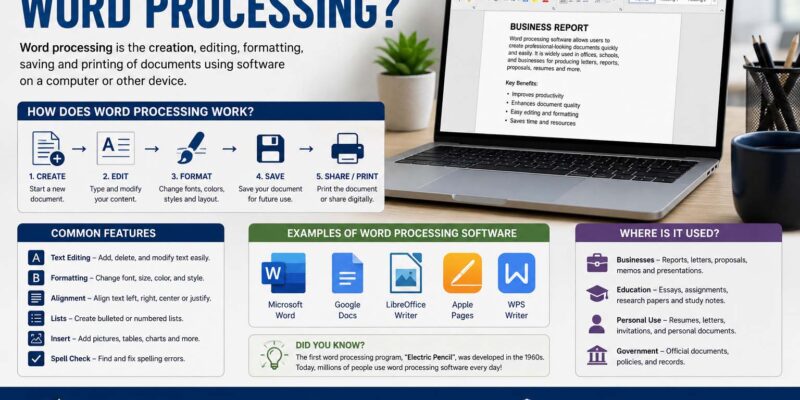
Word processing is the process of creating, editing, formatting, saving, and printing text-based documents using a computer or digital device.
Unlike a traditional typewriter, modern office document software allows users to:
- Edit text without retyping an entire page
- Change fonts and formatting
- Insert images and tables
- Check spelling and grammar
- Save documents digitally
- Share files electronically
Today, word processing is an essential skill for students, employees, entrepreneurs, and business owners. Companies that create standardized documents, such as What Is SOP guides, often rely on word processors software to ensure consistency across departments.
Word Processing Software?
Many people ask, what is word processing software.
Word processing software is a computer application designed to create and manage text documents.
Popular features include:
- Text formatting
- Spell checking
- Grammar suggestions
- Templates
- Page layout tools
- Image insertion
- Tables and charts
- Document collaboration
- Export to PDF
These features help users create professional-looking documents quickly and efficiently.
What Is a Word Processing Program?
Another common question is, what is a word processing program.
A word processorsprogram is the specific software used to create and edit documents.
Some well-known examples include:
- Microsoft Word
- Google Docs
- Apple Pages
- LibreOffice Writer
- WPS Writer
Each program offers similar core functions while providing unique tools for different users and business needs.
What Is a Word Processing Document?
A word processing document is a digital file created using word processing software.
Common document types include:
- Business letters
- Reports
- Contracts
- Proposals
- Meeting agendas
- Resumes
- Manuals
- Newsletters
- Project documentation
Most documents can be saved in formats such as DOCX, ODT, PDF, or RTF.
Why Is Word Processing Important in Business?
Businesses rely on word processing every day.
It supports communication, organization, and professionalism across nearly every department.
Common business uses include:
- Writing employee handbooks
- Creating marketing materials
- Preparing contracts
- Drafting client proposals
- Producing invoices
- Documenting company policies
- Recording meeting minutes
Organizations that regularly prepare How to Write Meeting Minutes documentation and client proposals benefit from consistent word processing practices that improve accuracy and collaboration.
Effective document processing improves both productivity and communication.
Today’s applications offer much more than simple typing.
Text Formatting
Users can change:
- Fonts
- Colors
- Sizes
- Alignment
- Spacing
Professional formatting improves readability.
Spell and Grammar Checking
Built-in tools identify common writing mistakes before documents are shared.
Templates
Templates help users create:
- Business letters
- Reports
- Resumes
- Flyers
- Meeting agendas
Using templates saves time while maintaining a professional appearance. Businesses can also use structured planning documents similar to a Marketing Strategy Template to organize campaigns, goals, and important information in a consistent format. Marketing teams may also prepare Creative Brief Examples and using the same word processing tools to keep projects organized and professionally formatted.
Collaboration
Cloud-based software allows multiple users to edit documents simultaneously.
This feature is especially useful for remote teams.
File Sharing
Documents can be shared through:
- Cloud storage
- Team collaboration platforms
This improves workflow and communication.
Step-by-Step Guide to Creating a Word Processing Document
Creating a professional document is simple.
Step 1: Open Your Word Processor
Launch your preferred application.
Step 2: Create a New Document
Choose either:
- Blank document
- Built-in template
Step 3: Enter Your Content
Write your text using clear headings and short paragraphs.
Step 4: Format the Document
Adjust:
- Headings
- Fonts
- Margins
- Lists
- Tables
Step 5: Review and Edit
Use spelling and grammar tools before saving.
Step 6: Save or Export
Save the file in your preferred format or export it as a PDF for sharing.
Real-World Examples of Word Processing
Word processing is used in many industries.
Small Businesses
Business owners create:
- Quotes
- Invoices
- Business plans
- Client letters
Schools
Students use word processors for:
- Essays
- Research papers
- Homework
- Presentations
Healthcare
Medical professionals prepare:
- Patient reports
- Policies
- Educational materials
Marketing
Marketing teams create:
- Promotional content
- Product descriptions
- Press releases
- Campaign documents
Business Strategy: Using Word Processing More Effectively
Businesses can maximize productivity by following a few best practices.
Standardize Templates
Use consistent templates for:
- Letters
- Contracts
- Reports
- Proposals
This saves time and strengthens brand identity.
Organize Digital Files
Create folders based on:
- Clients
- Projects
- Departments
- Years
Good organization makes documents easier to locate.
Enable Cloud Storage
Cloud storage allows employees to access documents from multiple devices while supporting collaboration and backup.
Train Employees
Basic training in formatting, templates, and collaboration tools improves efficiency and reduces errors.
Tips for Better Word Processing
Follow these practical tips.
Keep Formatting Consistent
Use the same:
- Font family
- Font size
- Heading style
- Line spacing
Consistency improves professionalism.
Use Headings
Clear headings make documents easier to navigate.
Proofread Carefully
Always review documents before sending or printing.
Save Frequently
Frequent saving reduces the risk of losing work.
Common Mistakes to Avoid
Avoid these common errors:
- Inconsistent formatting
- Too many font styles
- Ignoring spelling mistakes
- Forgetting page numbers
- Not backing up important documents
Small improvements can make documents look much more professional.
Frequently Asked Questions
What is word processing?
document editing software is the creation, editing, formatting, saving, and printing of digital text documents using specialized software.
What is word processing software?
document creation software software is a computer application used to create and edit documents with tools such as formatting, spell checking, and templates.
What is a word processing program?
A word processing program is the software used for creating documents, such as Microsoft Word or Google Docs.
What is a word processing document?
A document creation software tools document is a digital file containing formatted text, images, tables, and other content created with a word processor.
Why is word processing important for businesses?
It improves communication, increases productivity, supports professional document creation, and One Pager Examples simplifies collaboration.
What skills are needed for word processing?
Basic typing, formatting, editing, proofreading, file management, and understanding document layouts are valuable digital document creation skills.
Conclusion
Understanding what is document editing is essential for anyone working in today’s digital environment. Whether you’re a student writing assignments, an entrepreneur preparing business proposals, or an office professional managing company documents, word processing software helps create polished, organized, and professional content.
By learning what is word processing software, understanding what is a word processing program, and knowing how to create a word processing document, you can improve productivity, enhance communication, and work more efficiently. As businesses continue to rely on digital documentation, strong document editing skills remain one of the most valuable competencies for long-term academic and professional success.