
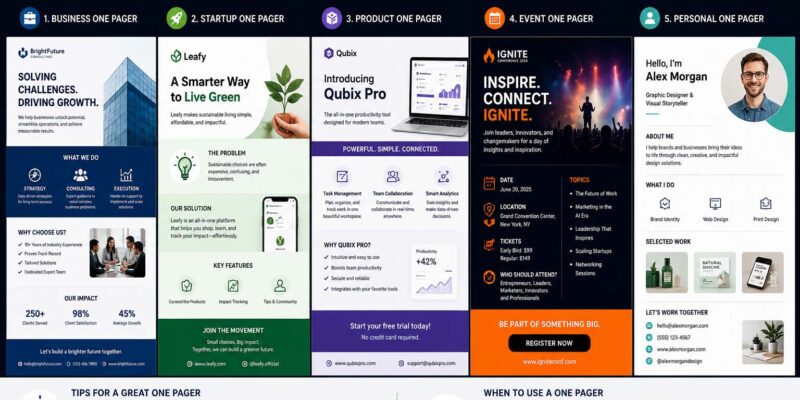
Imagine you have only one page to explain your business, project, or idea. Reviewing practical one pager examples can help you decide which essential details to include and how to present them clearly.
That’s the purpose of a one-pager. Instead of asking people to read a lengthy report or presentation, a one-pager summarizes the most valuable information in a clear and organized format.
This guide shares practical one pager examples, explains when to use them, and provides tips for creating a document that is easy to understand and visually appealing.
What Is a One Pager?
A one pager is a single-page document that communicates essential information quickly.
Businesses use one-pagers to explain:
Products
Services
Projects
Marketing campaigns
Business ideas
Company overviews
The goal is to help readers understand the most important details without reading multiple pages.
Why Businesses Use One Pagers
Professionals often have limited time.
A one-pager allows decision-makers to understand a proposal in just a few minutes.
Common benefits include:
Faster communication
Clear organization
Easy sharing
Professional appearance
Better first impressions
Many companies use one-pagers during meetings, sales presentations, and client discussions.
Essential Components of a Powerful One-Page
Although every document is different, most successful one-pagers include several core sections.
Title
Start with a clear headline.
Readers should immediately understand the topic.
Brief Summary
Introduce the purpose in one or two short paragraphs.
Main Points
Highlight the most valuable information using headings or bullet points.
Visual Elements
Include:
Icons
Charts
Diagrams
Graphics
Brand colors
Visuals improve readability without overwhelming the page.
Contact Information
Business one-pagers usually end with:
Website
Phone number
Social media links
One Pager Examples
Here are several practical one pager examples used across different industries.
TypePurposeCompany OverviewIntroduce a businessProduct One PagerExplain a product or serviceSales One PagerSupport sales conversationsMarketing CampaignSummarize promotional plansEvent One PagerPresent event informationStartup One PagerIntroduce a new business idea
Each serves a different audience while following the same goal: communicate quickly.
Business One Pager Example
A business one-pager might include:
Company logo
Business description
Services offered
Customer benefits
Key statistics
Contact information
Instead of lengthy paragraphs, concise sections make scanning easier. Businesses developing detailed client materials may also review Creative Brief Examples to organize objectives, audience information, and proposed solutions clearly.
Sales One Pager Example
Sales teams often use one-pagers during meetings.
Typical sections include:
Customer problem
Product solution
Key features
Benefits
Pricing overview
Customer testimonials
Call to action
This format allows potential buyers to understand the offer quickly.
Startup One Pager Example
Investors often request a one-page business summary before reviewing a full business plan.
Include:
Company mission
Target market
Problem being solved
Solution
Revenue model
Competitive advantage
Growth opportunity
This helps investors quickly evaluate the opportunity. Many founders also review Sole Proprietorship Examples when choosing a suitable structure for a new business.
One-Pager Examples for Marketing
Many people search for one-pager examples related to marketing.
Marketing one-pagers often summarize:
Campaign goals
Audience
Budget
Timeline
Expected outcomes
Performance metrics
Everything fits onto a single page for quick review. Some marketing teams also use a Marketing Strategy Template to organize campaign planning before creating a one-pager.
One Pager Project Examples
Businesses frequently create one pager project examples to keep teams aligned.
A project one-pager may contain:
Project name
Objectives
Timeline
Budget
Team members
Deliverables
Success measurements
This provides everyone with a shared understanding of the project’s direction.
One Pager Examples for Students
Although this guide focuses on business, many readers also search for one-pager examples for students.
Students often use one-pagers to summarize:
Books
Research projects
Historical events
Science topics
Presentations
Instead of writing long reports, they organize important information into one visual page.
Business professionals sometimes use the same communication style during workplace presentations.
AVID One Pager Examples
Some readers specifically search for AVID one pager examples.
In educational settings, AVID one-pagers encourage students to demonstrate understanding through a combination of:
Written summaries
Quotes
Symbols
Illustrations
Personal reflections
Although designed for classrooms, the same principles—clarity, organization, and visual communication—also benefit business documents.
How to Create a One Pager
Creating a professional one-pager is easier than many people think.
Step 1: Define the Goal
Decide exactly what readers should understand after viewing the page.
Step 2: Choose Essential Information
Include only the most valuable details.
Avoid unnecessary explanations.
Step 3: Organize Sections
Use headings that guide readers naturally from top to bottom.
Step 4: Add Visuals
Simple graphics improve engagement while saving space.
Step 5: Review Everything
Remove duplicate information.
Keep sentences short and direct.
Design Tips
Good design improves readability.
Consider these best practices.
Use White Space
Crowded pages become difficult to read.
Leave space between sections.
Keep Fonts Consistent
Limit yourself to two or three font styles.
Highlight Key Numbers
Statistics often stand out when displayed in larger text.
Use Brand Colors
Consistent branding creates a professional appearance.
Common Mistakes
Many one-pagers become less effective because they include too much information.
Avoid these mistakes.
Too Much Text
Readers should scan the page quickly.
Large blocks of text defeat the purpose of a one-pager. Instead, use brief paragraphs, bullet points, headings, and visuals to present information in a way that is easy to read and quickly understand.
Weak Headlines
Clear headings improve navigation.
Poor Layout
Sections should flow logically from top to bottom.
Missing Contact Details
Readers need an easy way to take the next step.
One Pager vs Full Business Plan
One PagerBusiness PlanOne pageMultiple pagesQuick overviewDetailed explanationEasy to shareComprehensive documentBest for introductionsBest for planning and fundingFocuses on highlightsIncludes full analysis
Many businesses use both documents for different situations.
Best Times to Use a One Pager
A one-pager works well for:
Client meetings
Sales presentations
Investor introductions
Networking events
Product launches
Internal projects
Team updates
Its flexibility makes it one of the most useful communication tools available.
Helpful Checklist
Before sharing your document, ask yourself:
Is the purpose clear?
Does the headline explain the topic?
Are key points easy to find?
Is unnecessary information removed?
Are visuals balanced?
Does the layout look clean?
Is contact information included?
Completing this checklist improves readability.
Tools for Creating One Pagers
Many professionals create one-pagers using:
Word processing software
Presentation software
Graphic design platforms
Online document editors
The software matters less than creating a document that’s easy to understand.
Frequently Asked Questions
What is a one pager?
A one pager is a single-page document that summarizes important information in a clear and organized format.
What Should Be Included in a Business One-Pager?
Most business one-pagers include a title, summary, key benefits, visuals, supporting information, and contact details.
Who uses one-pagers?
Businesses, entrepreneurs, marketers, educators, project managers, sales teams, and students all use one-pagers.
How long should a one pager be?
A true one-pager fits on a single page while presenting only the most essential information.
Are one-pagers better than presentations?
They serve different purposes. One-pagers provide a quick overview, while presentations allow more detailed explanations.
Turning Ideas Into Clear Communication
Strong one pager examples show that effective communication doesn’t require dozens of pages. A well-designed one-pager highlights the most valuable information, keeps readers engaged, and makes complex topics easier to understand.
Whether you’re introducing a startup, presenting a project, explaining a service, or supporting a sales conversation, a thoughtful one-pager can save time and create a stronger first impression. Focus on clarity, simple design, and the information your audience needs most, and your one-pager will become a valuable business tool.