Choosing the right customer relationship management (CRM) platform can transform how your business manages sales, marketing, and customer support. If you’re wondering how to choose a CRM system, you’re not alone. With hundreds of options on the market, it’s easy to feel overwhelmed by features, pricing, and technical terms.
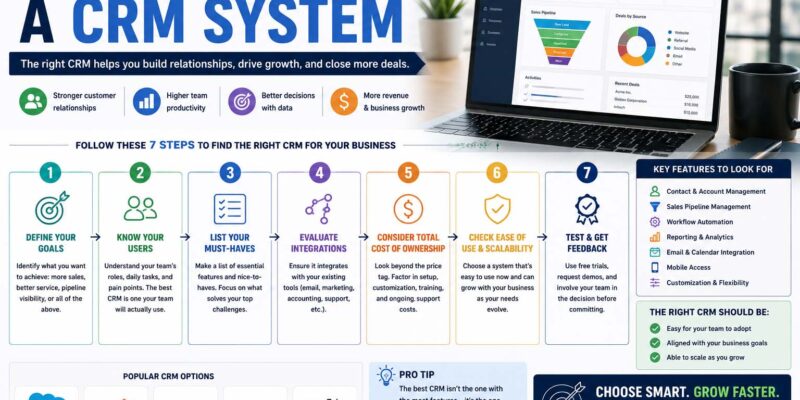
The best CRM isn’t necessarily the one with the most tools—it’s the one that fits your business processes, supports your goals, and your team will actually use. This guide walks you through everything you need to know before making a decision, whether you’re a startup, a growing company, or an established enterprise.
What Is a CRM System?
A CRM (Customer Relationship Management) system is software that helps businesses organize customer information, track interactions, manage sales opportunities, and improve communication across teams.
Instead of storing customer data in spreadsheets or scattered emails, a CRM keeps everything in one place. Sales representatives, marketers, and customer service teams can all access the same information, making collaboration much easier.
A CRM often includes features such as:
- Contact management
- Sales pipeline tracking
- Task reminders
- Email integration
- Reporting and analytics
- Marketing automation
- Customer support tools
Why Learning How to Choose a CRM System Matters
A CRM becomes part of your daily operations. Choosing the wrong one can lead to low employee adoption, wasted money, and inefficient workflows.
The right CRM helps businesses:
- Build stronger customer relationships
- Improve sales visibility
- Automate repetitive tasks
- Make better business decisions with data
- Increase team productivity
If your company is also building a voice of the customer program, your CRM can become the central place for collecting customer feedback and tracking satisfaction over time.
Start with Your Business Goals
Before comparing software vendors, define what success looks like for your business.
Ask yourself questions like:
- Are you trying to increase sales?
- Do you need better customer support?
- Is your marketing team struggling with lead management?
- Do you want more accurate forecasting?
Your goals should guide every decision.
For example, a business focused on improving sales may prioritize pipeline management, while a service-based company may need stronger customer support features.
Identify Your Biggest Challenges
Many businesses buy software before understanding their real problems.
Take time to identify issues such as:
- Lost customer information
- Poor communication between teams
- Manual follow-up processes
- Inconsistent reporting
- Difficulty tracking customer history
Once you understand these pain points, choosing the right CRM becomes much easier.
How to Choose a CRM System Based on Business Size
Different businesses have different requirements.
How to Choose a CRM System for a Small Business
When learning how to choose a CRM system for a small business, simplicity often matters more than advanced functionality.
Look for a CRM that offers:
- Easy setup
- Affordable pricing
- Mobile access
- Email integration
- Basic automation
- Room to grow
Many small businesses don’t need enterprise-level customization during their early stages.
Instead, focus on software your employees can learn quickly.
Growing Businesses
As your business expands, you’ll likely need:
- Workflow automation
- Team collaboration tools
- Custom dashboards
- Sales forecasting
- Third-party integrations
Scalability becomes just as important as current features.
Large Organizations
Enterprise companies often require:
- Advanced permissions
- Multiple departments
- API access
- Custom reporting
- High-level security
- International support
Choosing an enterprise CRM usually involves IT, management, and department leaders working together.
Essential CRM Features to Compare
Every CRM advertises dozens of capabilities, but some matter more than others.
| Feature | Why It Matters |
|---|---|
| Contact Management | Keeps customer information organized |
| Sales Pipeline | Tracks deals through each stage |
| Task Automation | Saves time on repetitive work |
| Reporting | Measures performance and trends |
| Mobile Access | Supports remote teams |
| Integrations | Connects with existing software |
| Security | Protects customer information |
| Customization | Matches your business processes |
Avoid paying for features your team is unlikely to use.
Think About Your Sales Process
Your CRM should support the way your team already sells rather than forcing completely new workflows.
For businesses relying on What Is Inside Sales strategies, features like email tracking, call logging, meeting scheduling, and automated follow-ups can significantly improve efficiency.
Meanwhile, field sales teams may place greater value on mobile apps and offline access.
Evaluate Ease of Use
A powerful CRM isn’t helpful if employees avoid using it.
When comparing systems, ask:
- Is the interface intuitive?
- Can new employees learn it quickly?
- Are dashboards easy to understand?
- Does it reduce daily work instead of adding more?
Many CRM vendors offer free trials or interactive demos.
Use these opportunities to let real team members test the software before purchasing.
Integration Should Be a Priority
Most businesses already use multiple tools.
Your CRM should integrate with systems such as:
- Email platforms
- Accounting software
- Marketing tools
- Calendar applications
- Customer support software
- Communication platforms
The fewer manual tasks your employees perform, the greater the value your CRM will provide.
Businesses working through broader Digital Transformation Consulting initiatives often choose CRM platforms that connect seamlessly with their existing technology stack instead of replacing every business application at once.
Consider Your Sales Funnel
A CRM should help manage prospects from the first interaction through long-term customer relationships.
Understanding What Is a Lead is an essential part of choosing CRM software because the platform should allow your team to capture, qualify, assign, and nurture leads efficiently.
Without effective lead management, valuable opportunities can easily fall through the cracks.
Compare Pricing Carefully
CRM pricing varies significantly.
Common pricing models include:
- Monthly subscription per user
- Annual subscription
- Tiered plans
- Enterprise pricing
- Custom quotes
When comparing costs, don’t focus only on the monthly fee.
Also consider:
- Implementation costs
- Training expenses
- Premium integrations
- Storage limits
- Support plans
- Future upgrades
A less expensive CRM can become costly if you quickly outgrow it.
Don’t Ignore Customer Support
Even excellent software occasionally creates questions.
Evaluate:
- Live chat availability
- Phone support
- Knowledge base
- Video tutorials
- Community forums
- Onboarding assistance
Strong customer support saves time during implementation and future updates.
How to Choose a CRM System for B2B Sales
Learning how to choose a CRM system for B2B sales involves looking beyond basic contact management.
B2B organizations often need:
- Long sales cycle tracking
- Multiple decision-maker records
- Opportunity management
- Account-based selling
- Forecast reporting
- Proposal tracking
Because enterprise sales involve more touchpoints, visibility throughout the sales process becomes especially valuable.
Industry-Specific CRM Considerations
Some industries require specialized CRM capabilities.
For example, businesses researching how to choose a treatment center CRM system should prioritize secure record management, appointment scheduling, compliance requirements, referral tracking, and communication tools tailored to healthcare environments.
Likewise, manufacturers, law firms, and real estate agencies often benefit from industry-specific CRM solutions.
Common Mistakes Businesses Make
Many CRM projects fail because of avoidable decisions.
Here are several common mistakes.
Choosing Based Only on Price
The cheapest option isn’t always the best value.
Poor usability or missing features may cost more over time.
Buying Too Many Features
Some organizations purchase enterprise software with hundreds of tools they never use.
Start with your needs rather than feature lists.
Ignoring Employee Feedback
Employees use the CRM every day.
Include representatives from sales, marketing, customer service, and management during the evaluation process.
Skipping Training
Even intuitive software benefits from proper onboarding.
Training increases adoption and helps employees use automation and reporting features effectively.
CRM Evaluation Checklist
Before making your final decision, confirm that the CRM meets these requirements:
- Fits your budget
- Supports current business goals
- Scales with company growth
- Integrates with existing software
- Offers reliable customer support
- Provides strong security features
- Includes useful reporting
- Has positive customer reviews
- Is easy for employees to learn
- Offers a free trial or demonstration
If most answers are “yes,” you’ve likely found a strong candidate.
Building Better Customer Relationships
A CRM is more than a sales database.
It helps businesses create consistent customer experiences from the first interaction through long-term loyalty.
When paired with a thoughtful Customer Engagement Strategy, CRM software allows businesses to personalize communication, track customer preferences, and identify opportunities to strengthen relationships over time.
Frequently Asked Questions
How do I choose the right CRM system?
Start by identifying your business goals, evaluating your current sales process, comparing essential features, testing usability, and confirming that the software integrates with your existing tools.
What is the most important CRM feature?
There isn’t a single feature that’s best for every business.
How long does CRM implementation take?
Small businesses may complete setup in a few days, while larger organizations with custom workflows and data migration may require several weeks or months.
Should small businesses invest in a CRM?
Yes. Even a simple CRM can improve organization, customer follow-up, and sales tracking while creating a strong foundation for future growth.
What should I avoid when choosing a CRM?
Avoid selecting software based only on price or popularity. Focus on business needs, employee adoption, scalability, and long-term value.
Your Next Step
Choosing a CRM isn’t about finding the platform with the longest feature list—it’s about finding the one that fits your team and supports your business objectives. Start by defining your goals, involve the people who will use the software every day, and compare solutions based on usability, integrations, scalability, and support.
As CRM platforms continue to evolve, this how to choose a CRM system guide 2026 2027 remains relevant because the core principles stay the same: understand your business, choose technology that solves real problems, and invest in a system your team will embrace for years to come.