
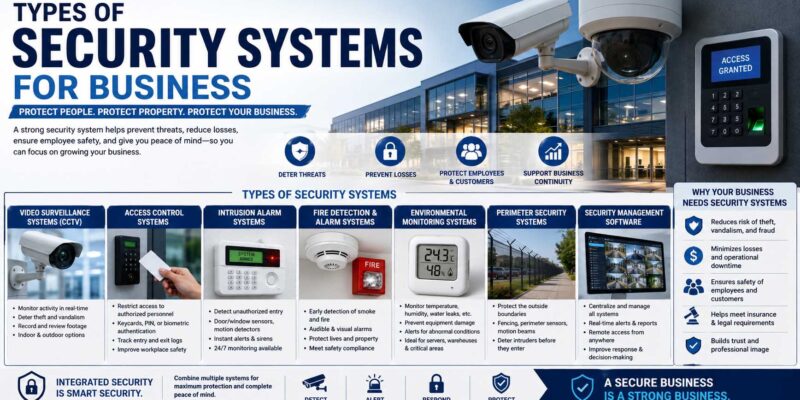
Protecting a company rarely comes down to installing one alarm by the front door. The main types of security systems for business cover several risks, including unauthorized entry, theft, fire, employee access, cyber threats, and incidents outside normal working hours. A small office may only need cameras, controlled entry, and an alarm, while a warehouse or multi-location company may need several connected security layers.
The best setup depends on what the business needs to protect. Therefore, owners should consider the building, employees, customers, equipment, data, inventory, working hours, and specific risks before buying equipment.
What Is a Business Security System?
A business security system combines technology, procedures, and sometimes professional monitoring to protect people, property, information, and business operations.
Physical security may include cameras, door sensors, locks, alarms, and access-control equipment. Meanwhile, digital security covers computers, networks, accounts, and business data.
Modern systems can connect several of these functions. For example, an access-control platform may record who entered a restricted room while nearby cameras provide video of the same event.
However, technology works best when employees also know what to do. Clear security procedures should explain who receives alerts, how employees report incidents, and what happens when credentials or equipment are lost. Businesses developing those processes may also benefit from understanding What Is SOP, since standard operating procedures help teams respond consistently instead of improvising during an incident.
Main Types of Security Systems for Business
Most organizations use more than one security category. In fact, combining complementary systems can cover gaps that a single technology leaves behind.
| Security System | Main Purpose | Common Business Uses |
|---|---|---|
| Intrusion alarm | Detect unauthorized entry | Offices, stores, warehouses |
| Video surveillance | Monitor and record activity | Entrances, sales floors, parking areas |
| Access control | Manage entry permissions | Offices, server rooms, restricted areas |
| Fire and life safety | Detect fire-related hazards | Most commercial premises |
| Cybersecurity | Protect systems and data | Businesses using digital technology |
| Environmental monitoring | Detect environmental threats | Warehouses, IT rooms, specialized facilities |
| Professional monitoring | Respond to system alerts | After-hours and multi-site protection |
The appropriate combination depends on risk. Therefore, a neighborhood office and a large distribution center should not automatically buy identical systems.
Intrusion Alarms: Types of Security Systems for Business
Commercial intrusion alarms detect activity that may indicate unauthorized entry.
A basic setup can include door and window contacts, motion detectors, glass-break sensors, control panels, sirens, and communication equipment. When a sensor triggers under the configured conditions, the system generates an alarm.
Some businesses use locally sounding alarms, while others connect their systems to professional monitoring services.
Wired vs. Wireless Business Alarms
Wired systems connect components through physical cabling. Consequently, they can make sense during new construction or major renovations when running cables is relatively straightforward.
Wireless systems communicate using radio technology and may be easier to install in existing buildings. However, businesses need to consider battery maintenance, signal coverage, interference, and cybersecurity depending on the product.
Hybrid systems combine both approaches and can be useful when expanding an existing installation.
Video Surveillance Systems for Business Security
Security cameras help businesses observe activity, review incidents, and maintain records where lawful and appropriate.
Modern systems may include indoor cameras, outdoor cameras, video doorbells, pan-tilt-zoom cameras, and specialized models for low-light environments.
Resolution matters, but it is not the only specification worth checking. Buyers should also consider field of view, lighting, frame rate, storage capacity, retention period, weather resistance, network bandwidth, and camera placement.
For example, a high-resolution camera mounted too far from an entrance may still fail to capture the detail a business expects.
Companies should also respect applicable privacy, employee-monitoring, audio-recording, and data-protection laws. Rules vary by jurisdiction, so businesses should check applicable legal requirements before installing cameras or microphones.
Access Control Security Systems for Business
Traditional keys work for small operations, yet they become difficult to manage as staff numbers and restricted areas grow.
Access-control systems allow businesses to decide who can enter particular spaces and when.
Credentials may include:
- Key cards
- Fobs
- Mobile credentials
- PIN codes
- Biometric identifiers
For example, every employee might access the main office, while only authorized workers can enter an inventory room or server area.
The system can also create access logs. Therefore, managers can investigate certain incidents without relying solely on physical keys.
When designing protection for warehouses or stockrooms, understanding the types of inventory a company holds can help determine which products need tighter access, specialized storage, or stronger monitoring.
Fire and Life-Safety Systems for Business
Security planning should not focus only on theft. Businesses also need appropriate life-safety measures.
Depending on the building and applicable regulations, systems may include smoke detection, heat detection, fire alarms, emergency notification, sprinklers, and carbon monoxide detection.
Requirements can differ by occupancy type, building design, location, and local code. Therefore, business owners should work with qualified professionals and follow applicable fire and building regulations rather than selecting life-safety equipment solely from a general online checklist.
Emergency exits and wayfinding matter as well. In that context, understanding the types of signs used in business environments can help owners think about clear directional, warning, safety, and informational communication throughout a property.
Cybersecurity Systems for Businesses
Physical security cannot protect a company from every threat. Since businesses store customer records, financial information, employee data, passwords, and intellectual property digitally, cybersecurity is another major security layer.
Common protections include firewalls, endpoint security, email filtering, multi-factor authentication, backups, encryption, access management, and network monitoring.
The Cybersecurity and Infrastructure Security Agency’s cybersecurity guidance for small businesses provides practical information about protecting business systems and data.
Software should also receive appropriate security updates. Meanwhile, employees need training because phishing and stolen credentials can bypass expensive technology when users are unprepared.
Backups deserve special attention. Businesses should maintain a backup strategy that fits their recovery needs and test whether they can actually restore critical information.
Security controls should also extend to cloud platforms. For instance, a company deciding how to choose a crm system should consider access permissions, authentication, vendor security practices, backups, integrations, and data-management requirements alongside sales features.
Insider Threat Security and Access Protection
Not every security incident starts with an unknown person outside the organization. Employees, contractors, vendors, or other trusted users may already have legitimate access to business resources.
An insider threat can involve intentional misconduct, but it can also result from negligence or compromised credentials.
Therefore, businesses should follow the principle of giving people only the access needed for their roles. They should also review permissions when responsibilities change and remove unnecessary access promptly when someone leaves.
Companies building a broader risk-management strategy may want to understand What Is the Goal of an Insider Threat Program, especially when they handle valuable intellectual property, sensitive customer data, financial systems, or restricted facilities.
However, companies should design insider-risk programs carefully. Security measures need to respect employee rights, applicable laws, and legitimate privacy expectations.
Environmental Monitoring for Business Security
Environmental sensors are easy to overlook, yet they can prevent major operational losses in certain businesses.
Depending on the facility, monitoring may detect:
- Water leaks
- Temperature changes
- Humidity
- Power failures
- Equipment conditions
- Certain gases or environmental hazards
For example, a server room can suffer serious problems if cooling fails. Similarly, businesses storing temperature-sensitive products may need alerts when storage conditions move outside acceptable limits.
These systems are especially useful when the property remains unattended overnight.
Professional Monitoring for Business Security Systems
A monitored security system sends certain alerts to a monitoring center or another designated response service.
This approach can provide coverage when no employees are on-site. However, the exact response depends on the provider, contract, alarm type, local rules, and system configuration.
Before signing a monitoring agreement, ask about response procedures, monthly fees, contract length, communication methods, equipment ownership, cancellation terms, and what happens during internet or power outages.
Also, check whether local authorities require permits or alarm registrations.
Cloud-Based vs. On-Premises Business Security
Many modern security platforms offer cloud management.
Cloud-based systems can allow authorized managers to view cameras, manage credentials, review events, and receive alerts remotely. As a result, they can be convenient for businesses with multiple locations.
However, cloud platforms create their own considerations. Internet connectivity, subscriptions, vendor security, data storage locations, account protection, and service availability all matter.
On-premises systems keep more infrastructure at the business location. They may offer greater direct control, but the company may also take on more responsibility for storage, updates, maintenance, and backups.
Neither approach is automatically better. The right choice depends on internal expertise, business size, security requirements, budget, and risk tolerance.
How to Choose Between Types of Security Systems for Business
Start with a risk assessment instead of a shopping list.
First, identify what you are protecting. This may include employees, customers, cash, inventory, equipment, vehicles, buildings, confidential information, and computer systems.
Next, identify where incidents could occur. Entrances, loading areas, cash-handling locations, server rooms, parking areas, stockrooms, and remote access systems may require different controls.
Then, rank risks by potential impact and likelihood.
A small professional office, for example, might prioritize controlled entry, cameras at entrances, an intrusion alarm, secure Wi-Fi, multi-factor authentication, and backups.
A warehouse may place greater emphasis on perimeter cameras, loading-bay surveillance, access-controlled stock areas, environmental monitoring, and after-hours alarms.
Finally, compare products as a complete system rather than buying isolated devices.
Features to Compare in Business Security Systems
When comparing the types of security systems for business, practical features matter more than simply choosing the system with the longest feature list. Therefore, evaluate each option according to the risks and requirements of your company.
For cameras, examine image quality, nighttime performance, storage, viewing angle, and retention options.
For access control, check how quickly administrators can add or remove users. Also, consider whether the platform supports different permission levels and useful audit records.
For alarm systems, ask about backup communication and power options.
Meanwhile, any internet-connected security product should receive particular attention for account security, software updates, encryption, vendor support, and administrative controls.
Scalability also matters. A system that works for one location today should not necessarily need complete replacement when the business adds another office.
Common Business Security Mistakes
One mistake is installing cameras while ignoring physical access. Video can document an incident, but controlling who enters a sensitive area may prevent some problems from occurring.
Another mistake is giving too many employees administrator privileges. Instead, assign access according to job responsibilities.
Businesses also sometimes install equipment and then forget about it. Cameras can become obstructed, batteries can fail, user accounts can remain active after employees leave, and software can become outdated.
Therefore, schedule regular reviews and testing.
Finally, avoid assuming that the most expensive system automatically provides the strongest protection. Good security comes from matching controls to actual risks and maintaining them properly.
FAQs About Business Security Systems
What Security System Does a Small Business Need?
Needs vary, but many small businesses consider intrusion detection, appropriately placed cameras, access control for sensitive areas, fire and life-safety systems required by local rules, and basic cybersecurity protections.
Are Wireless Security Systems Suitable for Businesses?
They can be. Wireless systems may offer flexible installation, especially in existing buildings. However, businesses should evaluate battery maintenance, wireless coverage, reliability, cybersecurity, and scalability.
Do Business Security Cameras Need Internet Access?
Not always. Some camera systems can record locally without continuous internet connectivity. However, remote viewing, cloud storage, notifications, and certain management features may require an internet connection.
How Often Should a Business Security System Be Reviewed?
There is no universal schedule for every business. Still, review the system regularly and whenever the business changes locations, adds sensitive areas, experiences an incident, changes staffing significantly, or introduces new technology.
Can One Security Platform Manage Cameras, Alarms, and Access Control?
Some integrated security platforms can manage multiple functions. However, compatibility varies, so confirm supported hardware, software integrations, licensing costs, and security features before buying.
Build Business Security in Layers
Choosing among the types of security systems for business becomes easier when you stop looking for one product that solves every problem. Instead, build protection in layers.
Start with the risks that could cause the greatest harm. Then, combine appropriate physical security, access control, monitoring, life-safety measures, cybersecurity, employee procedures, and training.
As the company grows, review the setup again. New employees, additional locations, more valuable inventory, remote work, and new software can all create different risks.
A practical business security system is not simply a collection of cameras and alarms. Instead, it is a coordinated plan that helps protect people, property, information, and operations while remaining manageable enough for the business to maintain over time.